
Wedding seating charts
Your wedding seating chart, on the venue’s own floor plan
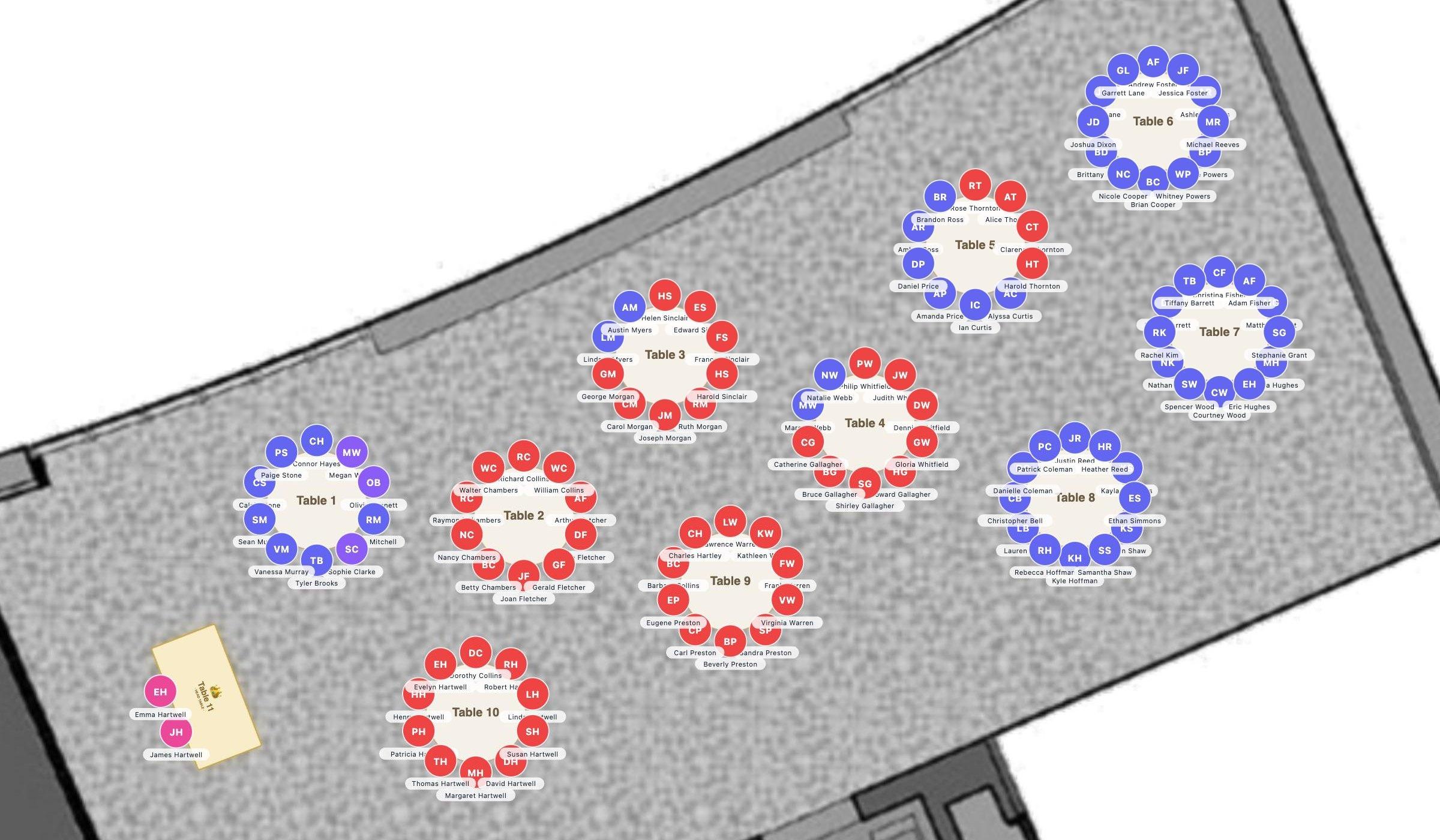
Plasey is a wedding seating chart maker that works on the real room. Upload the venue’s floor plan, bring in your guest list, and seat everyone by your rules: couples side by side, families together, and two guests who shouldn’t share a table kept apart. On the day, every guest finds their seat on their phone, so nobody crowds around a seating board.
No account needed. Nothing is saved until you sign up.
How it works
From guest list to seated room
- 1
Start from the room
Upload the venue’s floor plan as a PDF or an image, or start from a room a venue has already laid out on Plasey. With Plasey’s AI, the scan finds the tables and counts their chairs; you can also place them by hand.
- 2
Bring in your guest list
On a paid plan, paste it or upload the CSV or Excel file you already keep, from any planning site or app; on the free plan, type your guests in. RSVPs, meal choices and plus-ones come with it, sit-with and keep-apart columns become seating rules, and importing it again updates the guests already there.
- 3
Seat everyone
Drag guests to their chairs, or let Smart Fill seat households and groups together. With Plasey’s AI, Auto-Seat seats the whole list by your rules and explains each table in a line.
- 4
Share it
Publish the chart and print its QR code on your welcome sign. Guests type their name and the chart zooms to their chair. The venue and the caterer get their reports as PDFs.
Made for the way weddings are seated
Seating rulesWith a paid plan
Sit together, keep apart, a fixed table, the accessible table. Every chart shows which rules it keeps.
Head and sweetheart tables
Mark the head table, and seat a long table on one side so everyone faces the room.
Changes until the last minute
Move a guest on the morning of the wedding and everyone who opens the link, or comes back to it, sees the new seat. Nothing to reprint.
A seat finder for every guest
A link and a QR code, on every plan. Guests search their name on any phone, with no app to download.
Reports for the venue
The venue layout, the catering report and the escort listing, as PDFs.
Your wedding’s lookWith a paid plan
Your names, fonts, colors and photos, and your monogram or logo, on the guest’s phone, the kiosk and a printed welcome sign.
Questions
- How do I make a wedding seating chart?
- Start once your RSVPs are in, with the final guest list and the venue’s floor plan. Place the head table first, then the family and friends who should sit near it, then fill the remaining tables by group, keeping couples and households together and guests who shouldn’t share a table apart. In Plasey that is four steps: upload the floor plan, import the guest list, add your rules, and seat everyone by hand, with Smart Fill or with Auto-Seat.
- How many guests fit at a wedding table?
- It depends on the table. A 60-inch round seats 8 comfortably and 10 snugly, a 72-inch round seats 10 to 12, and an 8-foot banquet table seats 8 to 10. Set your floor plan’s scale in Plasey and the tables you add come in at their real size; with Plasey’s AI, the scan counts the chairs drawn on the venue’s plan.
- Can guests find their table on their phones?
- Yes. Publish the chart and share its link or QR code; guests type their name and the chart zooms to their seat. The guest link comes with every plan, including the free one, and guests see names and seats only, never contact details.
- Can the couple and their families see the chart before the day?
- Yes. On any paid plan, invite them by email to view the event: viewers are free, and only editors take a seat.
- Do I need the venue’s floor plan?
- No. You can start on a blank canvas and arrange the tables yourself. With the floor plan, though, the chart matches the room the venue will set, and venues that list their rooms on Plasey publish them with the tables already laid out.
- How much does a wedding seating chart cost on Plasey?
- It is free for up to 15 guests and 3 tables. A Signature license covers one wedding: $149 for up to 250 guests, $449 for 750, or $999 for 2,000. Plasey’s AI comes with every paid plan.
More of what Plasey does
Seat your next event on Plasey.
Free for up to 15 guests · Signature from $149 per event · Studio from $83/mo billed annually, with Plasey’s AI · See plans